내가 연 것은 열람 신호로 세지 않습니다
연결한 Gmail 계정의 추적 이미지는 이 Chrome 프로필의 Gmail 화면에서 불러오지 않도록 막습니다. 보낸 메일을 내가 열어 봐도 수신자의 열람 신호로 기록되지 않습니다.
확장이 없는 기기나 브라우저(휴대폰의 Gmail 앱 포함)에서 연 것은 막지 못합니다.
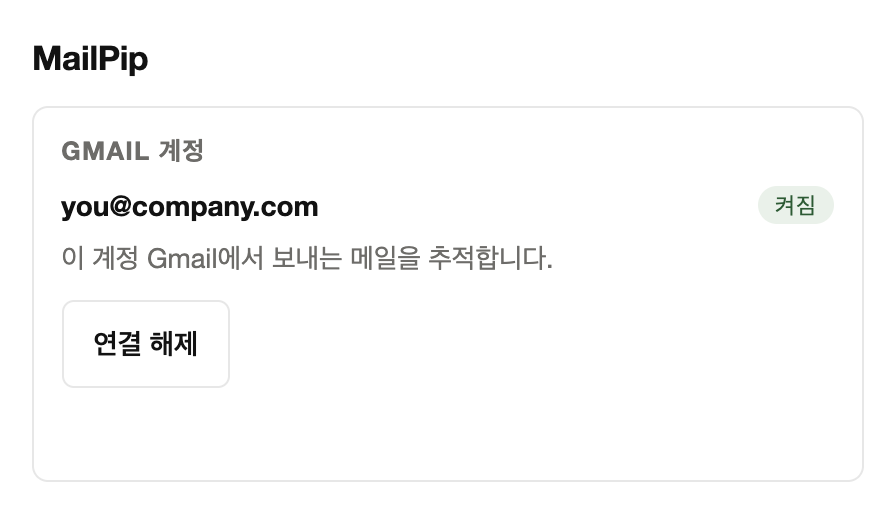
Gmail에서 평소처럼 보내기만 하면 됩니다. Chrome 확장을 설치하고 Google 계정을 한 번 연결하세요.
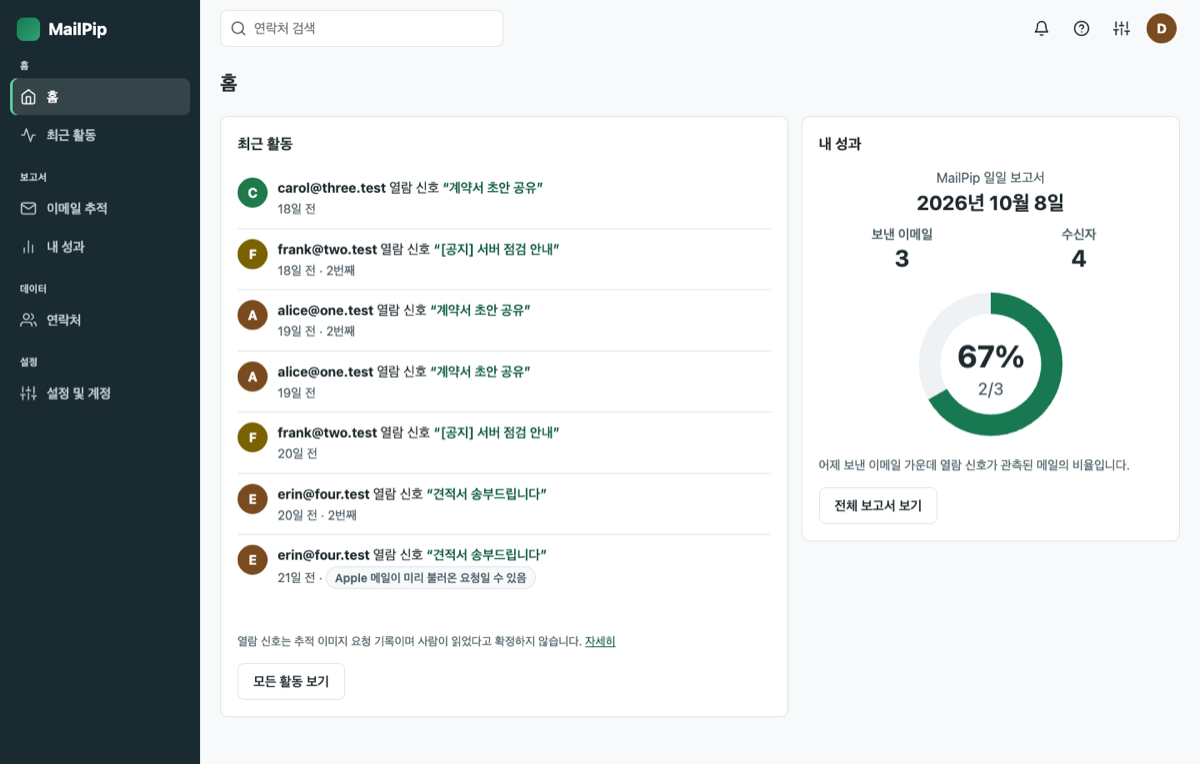
연결한 Gmail 계정의 추적 이미지는 이 Chrome 프로필의 Gmail 화면에서 불러오지 않도록 막습니다. 보낸 메일을 내가 열어 봐도 수신자의 열람 신호로 기록되지 않습니다.
확장이 없는 기기나 브라우저(휴대폰의 Gmail 앱 포함)에서 연 것은 막지 못합니다.
메일은 사용자의 Gmail이 사용자 계정에서 그대로 보냅니다. MailPip 서버를 거치지 않는 구조라 스팸으로 분류될 가능성을 줄이는 쪽입니다.
받은편지함에 도착할지는 수신자의 메일 서비스가 정하며 MailPip은 약속하지 않습니다.
유료 요금제에서 받는 사람이 둘 이상이면 수신자마다 사본을 따로 보내고, 각 사본에는 그 수신자 전용 추적 이미지가 들어갑니다. 메일 상세에서 수신자 3명 중 2명처럼 누구에게서 신호가 있었는지 구분해 봅니다.
열람 신호는 추적 이미지가 요청되었다는 기록이며 수신자가 읽었다는 증거가 아닙니다.
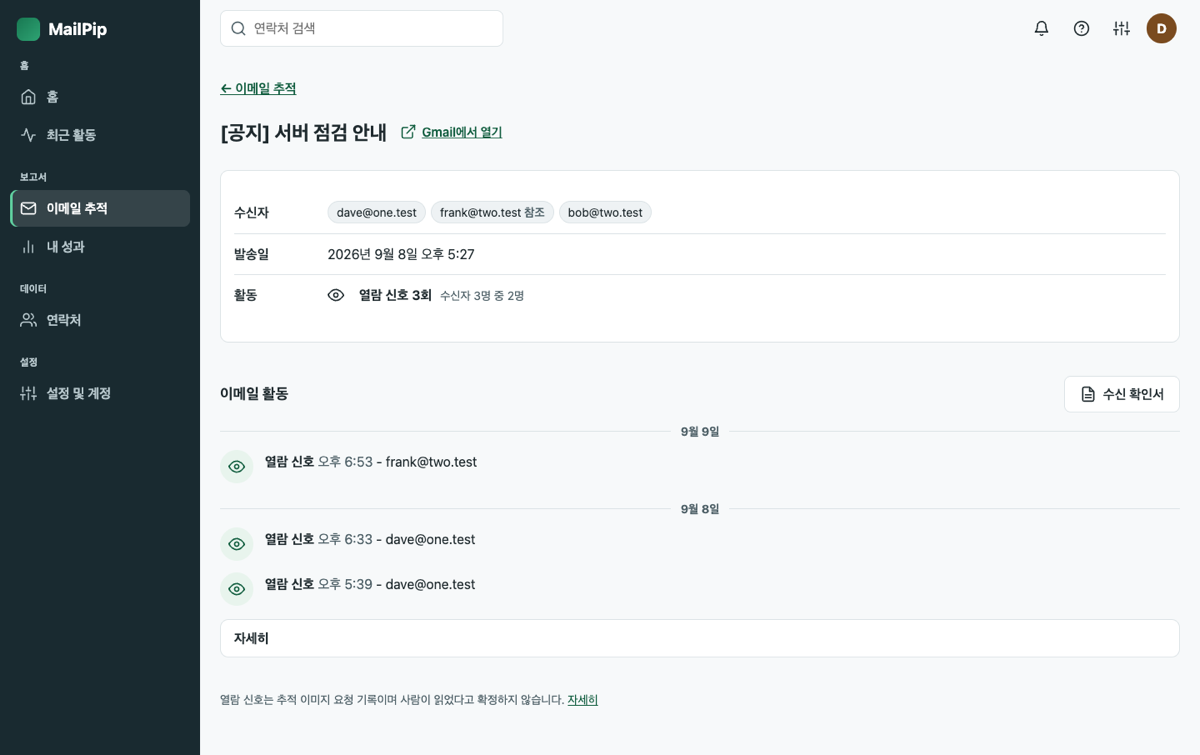
로그인하면 보낸 메일과 열람 신호를 화면별로 나눠 봅니다.
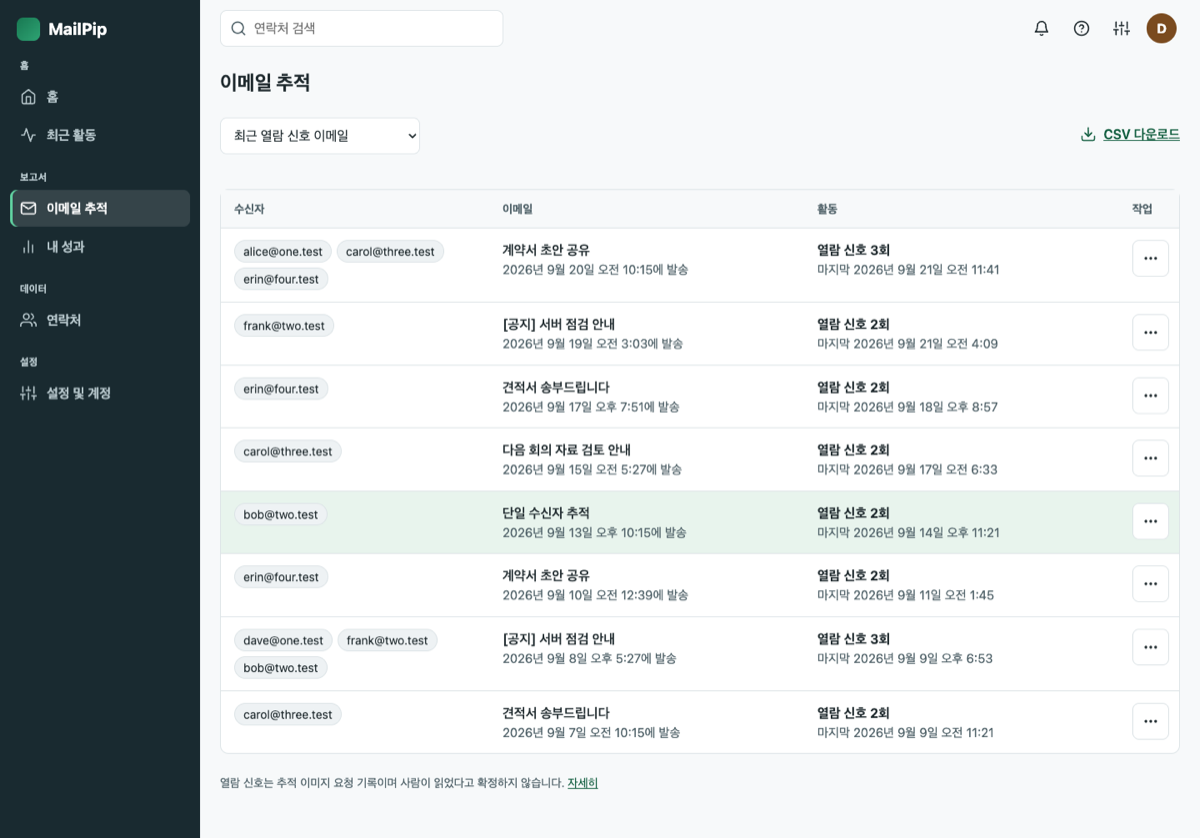
열람 신호를 날짜별로 모아 보여 줍니다.
보낸 메일을 최근 열람 신호, 전체, 열람 신호 없음으로 나눠 보고 CSV로 내려받습니다.
기간별 열람 신호율과 발송 시간대를 봅니다.
받는 사람별로 보낸 메일과 열람 신호가 있었던 메일을 모아 봅니다.
메일 하나의 기록을 A4 문서로 인쇄하거나 PDF로 저장합니다. 추적을 취소했거나 보내지 않은 메일에는 만들지 않습니다. 유료 요금제에서 쓸 수 있습니다.

Apple 메일은 사람이 읽기 전에 받은 메일의 이미지를 미리 불러옵니다. 그런 요청이면 "미리 불러온 요청일 수 있음"으로 구분해 보이고 사람이 읽었다고 말하지 않습니다. Gmail 보안 검사가 가져간 요청은 열람 신호에 넣지 않습니다.
작성 원문과 첨부는 암호화해 발송이 끝나면 지웁니다. 받은편지함은 무응답 알림을 켠 유료 요금제(체험 포함) 계정에 한해(기본 꺼짐) 머리글을 읽고, 머리글로 정할 수 없는 일부 메일은 메일 전체를 받아 HTML 본문에서만 답장 표지를 찾으며, 읽은 내용은 저장하지 않습니다. 메시지 정보와 열람 신호는 계정이 있는 동안 보관하고, 계정을 삭제하면 지웁니다. 링크 클릭 추적을 제공할 때 서명한 본문 링크 주소는 메시지 정보와 함께 보관하고, 메일을 삭제하거나 계정을 삭제하면 지웁니다. 개인정보를 판매하지 않고, Google 사용자 데이터를 광고에 쓰지 않습니다. 보관 항목과 기간
Google API로 받은 정보의 사용에 대한 고지를 영문 원문 그대로 싣습니다. 자세한 내용은 개인정보처리방침 제13조에 있습니다.
MailPip's use of information received from Google APIs will adhere to Google API Services User Data Policy, including the Limited Use requirements.
The use of information received from Google APIs will adhere to the Chrome Web Store User Data Policy, including the Limited Use requirements.
무료와 유료, 두 가지 요금제가 있습니다. 아래 표에서 차이를 비교할 수 있습니다.
Gmail이 직접 보내고 메일 하나에 추적 이미지 하나를 넣습니다. 받는 사람이 여럿이어도 메일 단위로 열람 신호를 보여 주며 누가 열었는지는 구분하지 않습니다. 열람 여부와 첫 열람 시각이 보이고, 여러 번 열렸는지는 잠금 표시로만 알려 줍니다.
메일 하단에 들어가는 MailPip 표기는 없습니다.
받는 사람이 둘 이상이면 MailPip 서버가 수신자별 사본을 보내 누가 열었는지 구분해 보여 줍니다. 전체 열람 기록과 수신 확인서를 쓸 수 있습니다.
유료 요금은 월 $5.99(한국 ₩7,900)이며 세금 포함입니다.
| 기능 | 무료 | 유료 |
|---|---|---|
| 메일 하단 표기(받는 사람에게 보이는 MailPip 소개 한 줄) | 없음 | 없음 |
| 추적 메일 수 | 무제한 | 무제한 |
| Gmail 보낸편지함 ✓✓·열람 카드·미열람 필터 | 제공 | 제공 |
| 열람 기록 | 열람 여부와 첫 열람 시각(여러 번 열렸는지는 잠금 표시) | 열람 횟수와 전체 타임라인 |
| 데스크톱 알림 | 열람·다시 열람 즉시 알림(몇 분 늦을 수 있음) | 열람·다시 열람·링크 클릭 즉시 알림 |
| 메일 알림 | 없음 | 열람·미열람·반복·재개·링크 클릭 알림, 답장이 확인되지 않으면 알림 |
| 자기 열람 제외 | 제공 | 제공 |
| 그룹 메일 | 메일 단위(누가 열었는지는 구분하지 않음) | 수신자별 |
| 웹 대시보드(홈·최근 활동·이메일 추적·내 성과·연락처) | 흐림 없이 전체 목록(기록은 첫 열람만) | 전체 기록 |
| CSV 내려받기 | 기본 열(열람 여부·첫 열람 시각) | 전체 열 |
| 링크 클릭 추적 | 없음(처음 14일 체험 동안만) | 전체 클릭(24시간에 링크 추적 메일 2,000통까지) |
| 보고서 메일 | 없음(일간 요약은 웹 화면에서 확인) | 일간·주간·월간 |
| 예약 보내기 추적(Gmail 예약) | 제공 | 제공 |
| 수신 확인서 | 제공 안 함 | 제공 |
| 체험 중 사용 한도 | 24시간 기준 서버 사본 받는 사람 100명, 링크 추적 메일 200통 | 해당 없음 |
새 계정은 처음 14일 동안 유료 기능을 체험합니다(카드 없음, Google 계정당 한 번). 체험이 끝나면 무료로 바뀌며 기록은 그대로입니다.
유료 요금제 결제는 준비 중입니다. 결제가 열리면 웹 앱의 설정 및 계정 > 요금제에서 바로 시작할 수 있습니다. 유료 기능을 시작하기 전에 알리고 동의를 받는 방식은 이용약관 제9조에 있습니다.
메일에 넣은 추적 이미지(무료 요금제는 메일 하나에 하나, 유료 요금제는 받는 사람마다 하나)가 서버에 요청된 기록입니다. 사람이 읽었다는 증거가 아니며, 신호가 없다고 읽지 않은 것도 아닙니다. 메일 앱이 이미지를 자동으로 불러와도 기록될 수 있습니다. 이용약관 제5조
Apple 메일은 사람이 읽지 않아도 받은 메일의 이미지를 미리 불러옵니다. 그래서 관측된 요청이 모두 Apple 중계를 거친 경우에는 "Apple 메일이 미리 불러온 요청일 수 있음"으로 구분해 보이며, 사람이 읽었다고 말하지 않습니다.
확장이 켜진 Chrome 프로필의 Gmail 화면에서는 기록되지 않도록 막습니다. 휴대폰의 Gmail 앱처럼 확장이 없는 곳에서 보낸편지함을 열면 본인 열람이 신호로 잡힐 수 있습니다.
Google이 메일을 검사하며 이미지를 가져가는 요청은 사람의 열람이 아니므로 열람 신호 횟수, 최근 활동, 수신 확인서에 넣지 않고 메일 상세의 타임라인에서도 숨깁니다. 메일 상세의 "자세히"에서 수신자별 "요청 출처"에만 "열람 아님"으로 따로 셉니다.
받는 사람이 한 명이거나 무료 요금제이면 Gmail이 사용자 계정에서 직접 보내고, 유료 요금제에서 받는 사람이 둘 이상이면 MailPip 서버가 사용자의 Gmail로 수신자별 사본을 대신 보냅니다. 어느 쪽이든 받은편지함 도착과 스팸 분류는 수신자의 메일 서비스가 정하며 MailPip은 약속하지 않습니다.
서버는 받은편지함의 메일 목록과 본문을 저장하지 않으며, 다음 한 경우를 빼고는 읽거나 분석하지 않습니다. 무응답 알림을 켠 유료 요금제(체험 포함) 계정에 한해(기본 꺼짐) 서버가 정해진 주기로 받은편지함에 들어온 메일 가운데 보낸 메일에 대한 답장인지 확인하기 위해 머리글을 읽고, 머리글로 정할 수 없는 일부 메일은 메일 전체(format=full)를 받아 그중 HTML 본문에서만 인용된 추적 표지를 찾아 대조하며, 읽은 메일의 본문과 목록은 저장하지 않고 남기는 것은 답장 확인 기록(메일·받는 사람·확인 방법·시각)과 점검 진행 시각뿐입니다. 보내려는 메일은 발송에 필요한 동안만 암호화해 두고 끝나면 지웁니다. 개인정보 및 보안 센터
웹 앱의 이메일 추적에서 지울 메일 줄 끝의 ⋯ 메뉴를 열고 "이메일 데이터 삭제"를 고릅니다. MailPip의 추적 기록만 지우며 Gmail에 있는 메일은 지워지지 않습니다. 발송이 진행 중인 메일은 끝난 뒤에 지울 수 있습니다.
확장을 제거하면 Gmail에서 새 메일의 추적이 켜지지 않습니다. MailPip 계정과 추적 기록은 남아 있으며, 모두 지우려면 웹 앱의 설정 및 계정에서 계정을 삭제하십시오. 삭제와 연결 해제
MailPip이 어떤 권한을 왜 쓰는지, 무엇을 어디에 보관하는지, 연결 해제와 삭제는 어떻게 하는지를 질문과 답으로 정리했습니다.
데스크톱 Chrome의 Gmail 웹 화면에서 동작합니다. 설치한 뒤 열리는 안내 탭에서 Google 계정을 한 번 연결합니다.
Chrome 웹 스토어 등록을 마치는 대로 이 자리에 설치 단추를 연결합니다.
설치하기 전에 확인해 주십시오. Chrome 웹 스토어의 소개 화면에도 같은 내용이 있습니다. 설치하기 전에 용도와 제거 방법을 알리는 것은 이용약관 제5조 제5항에 따른 것입니다.
chrome://extensions를 입력해 열린 화면에서 MailPip을 제거하면 안내 페이지가 열립니다. 제거해도 MailPip 웹 계정, Google 계정 연결, 지난 기록과 유료 요금제의 구독은 그대로 남고, 계정이 있는 동안 서버는 이미 보낸 메일의 열람 신호를 계속 기록합니다(보낸 메일에 이미 든 추적 이미지는 그대로 남기 때문입니다). 제거하면 확장 프로그램이 해 주던 내 열람 차단이 없어져 내가 직접 연 것도 열람 신호로 잡힐 수 있습니다. Gmail에 만든 숨긴 라벨과 필터는 웹 앱 설정에서 Google 연결을 해제하거나 계정을 삭제하면 지워집니다(Google 쪽 상태에 따라 정리가 실패할 수 있습니다). 계정을 지우려면 웹 앱 설정에서 계정을 삭제하고, 구독만 끝내려면 구독을 해지하십시오.수집하는 정보와 처리 방법은 개인정보처리방침(https://mailpip.app/privacy)에서 확인하실 수 있습니다.
문의는 contact@mailpip.app으로 받습니다. 서비스 운영자 정보는 이용약관에 있습니다.
Send from Gmail as usual. Install the Chrome extension and connect your Google account once.
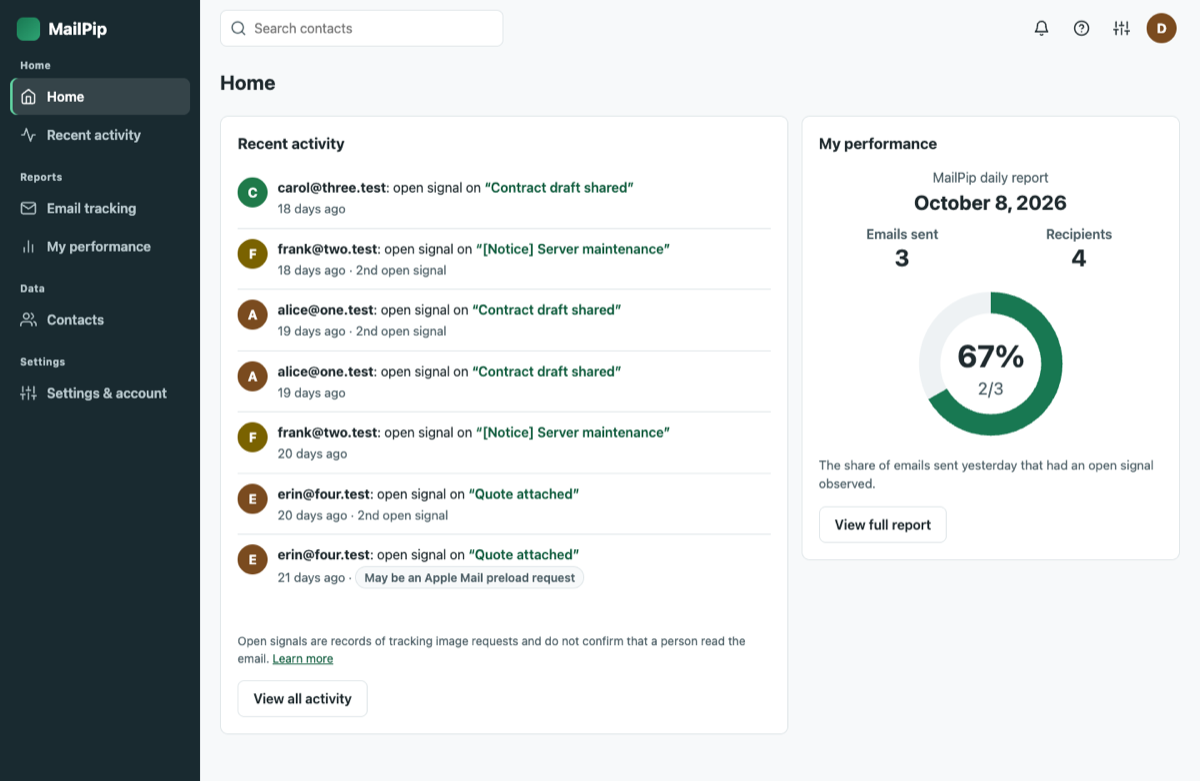
MailPip blocks the tracking images of your connected Gmail account from loading in Gmail in this Chrome profile. Opening an email you sent is not recorded as the recipient's open signal.
Opens on devices or browsers without the extension (including the Gmail app on a phone) cannot be blocked.
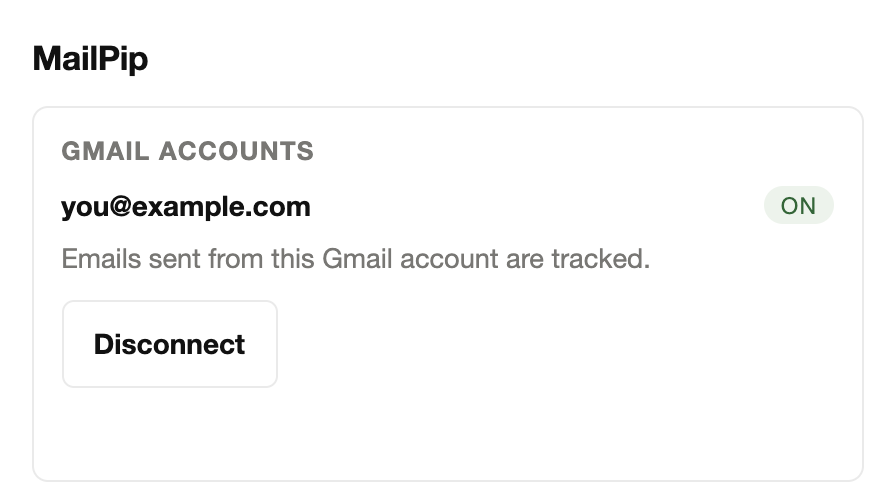
Gmail sends the email from your own account as it is. Because it does not pass through a MailPip server, the structure leans toward lowering the chance of being classified as spam.
Whether it reaches the inbox is decided by the recipient's mail service, and MailPip makes no promise about it.
On the Paid plan, with two or more recipients, MailPip sends each recipient a separate copy, and each copy carries a tracking image unique to that recipient. On the email detail screen you can tell who an open signal came from, for example 2 of 3 recipients.
An open signal is a record that a tracking image was requested. It is not proof that the recipient read the email.
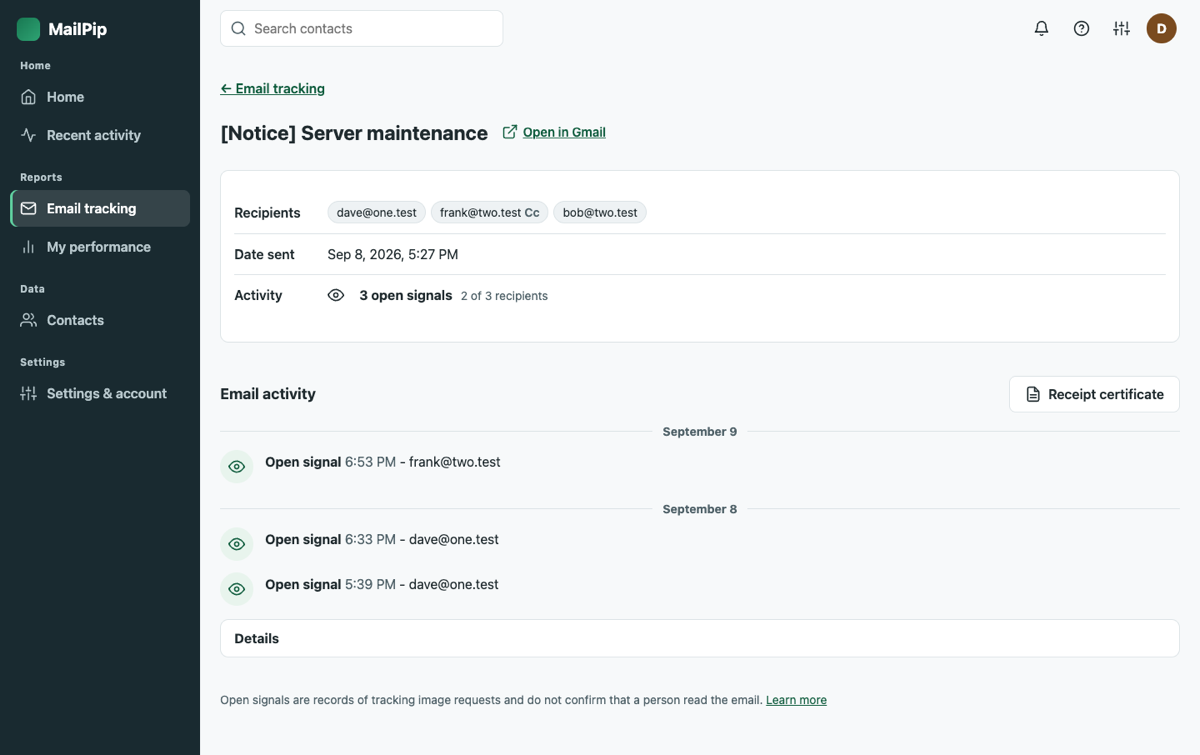
After you sign in, sent emails and open signals are split across screens.
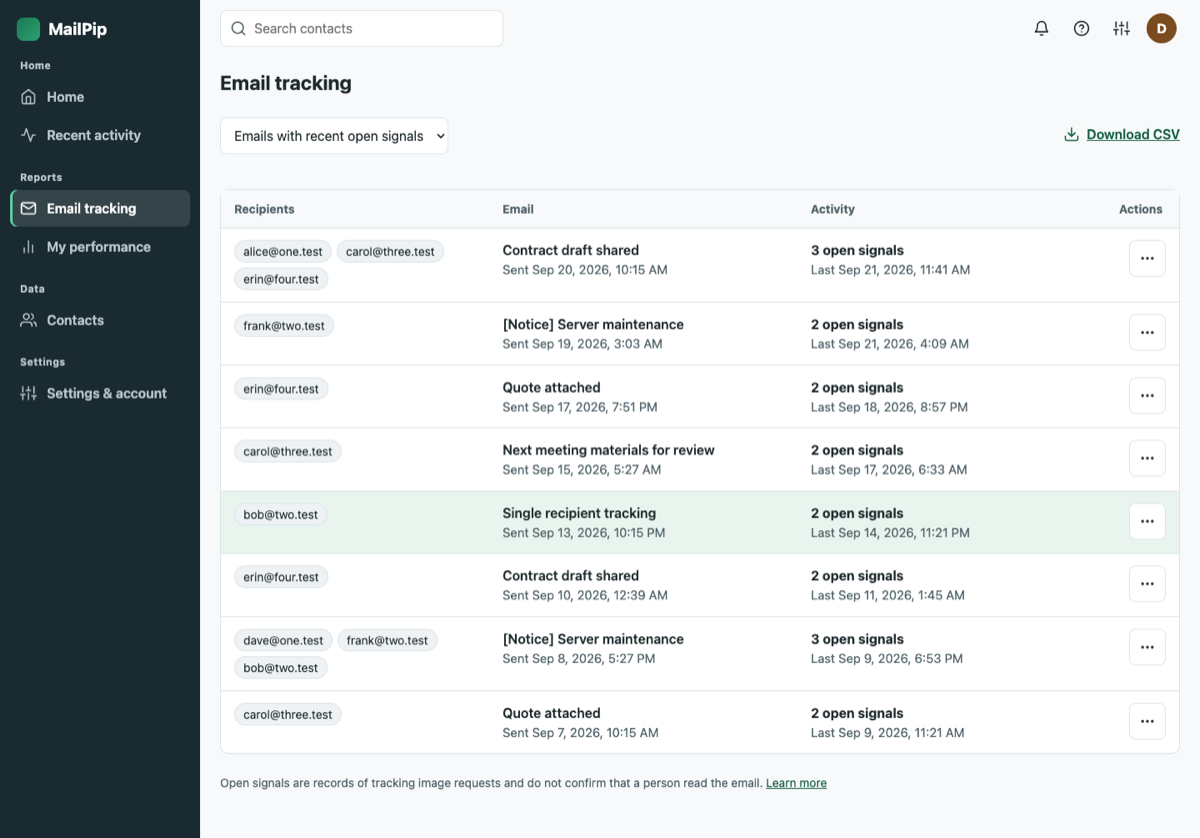
Open signals collected by date.
Browse sent emails as recent open signals, all, or no open signal, and download them as CSV.
The open signal rate and send hours for a period.
Emails sent to each recipient and the ones with an open signal, gathered together.
Print the record of one email as an A4 document or save it as a PDF. It is not created for emails whose tracking was canceled or that were not sent. Available on the Paid plan.

Apple Mail preloads the images of a received email before anyone reads it. Such a request is labeled "May be an Apple Mail preload request", and MailPip does not say a person read the email. Requests fetched by Gmail's security scan are not counted as open signals.
Message content and attachments are encrypted and deleted once sending finishes. Your inbox is read only for accounts on the Paid plan (trial included) that have turned on no-reply alerts (off by default): the headers are read and, for some mail the headers cannot settle, the full message is fetched to look for a reply marker in its HTML part only, and what was read is not stored. Message information and open signals are kept while your account exists, and deleted when you delete your account. When link click tracking is offered, the signed link addresses in the body are kept with message information and deleted when you delete the email or your account. Personal information is not sold, and Google user data is not used for advertising. What is kept, and for how long
These are the disclosures about the use of information received from Google APIs, quoted word for word. Details are in Article 13 of the Privacy Policy.
MailPip's use of information received from Google APIs will adhere to Google API Services User Data Policy, including the Limited Use requirements.
The use of information received from Google APIs will adhere to the Chrome Web Store User Data Policy, including the Limited Use requirements.
There are two plans, free and paid. The table below compares them.
Gmail sends the email directly and one tracking image goes into each email. With several recipients, open signals are shown per email and do not show which recipient. You see whether there is an open signal and the first open signal time; a lock mark is the only sign that there are more.
No MailPip mark is added to the bottom of the email.
With two or more recipients, the MailPip server sends a separate copy to each recipient and shows which recipient each open signal came from. You get the full open signal history and the receipt certificate.
The Paid plan costs $5.99 a month (₩7,900 in Korea), tax included.
| Feature | Free | Paid |
|---|---|---|
| Email footer mark (one line about MailPip that recipients see) | None | None |
| Number of tracked emails | Unlimited | Unlimited |
| Gmail Sent folder ✓✓, open signal card and no-open-signal filter | Included | Included |
| Open history | Whether there is an open signal and the first open signal time (a lock mark shows when there are more) | Number of open signals and the full timeline |
| Desktop notifications | Notifications for open signals and repeat open signals (may arrive a few minutes late) | Instant notifications for open signals, repeat open signals and link clicks |
| Email alerts | None | Alerts for open signals, no open signal, repeated open signals, open signals after a long gap and link clicks, plus an alert when no reply is confirmed |
| Your own opens excluded | Included | Included |
| Group email | Per email (does not show which recipient) | Per recipient |
| Web dashboard (home, recent activity, email tracking, my performance, contacts) | Full list with nothing blurred (history shows the first open signal only) | Full history |
| CSV download | Basic columns (open signal yes/no and the first open signal time) | All columns |
| Link click tracking | None (available only during the first 14-day trial) | Every click (up to 2,000 link-tracked emails per 24 hours) |
| Report emails | None (the daily summary is on the web screen) | Daily, weekly and monthly |
| Tracking for Gmail Schedule send | Included | Included |
| Receipt certificate | Not included | Included |
| Usage limits during the trial | Up to 100 recipients of server copies and 200 link-tracked emails per 24 hours | Not applicable |
New accounts try the Paid features for the first 14 days (no card, once per Google account). When the trial ends the account switches to the Free plan and its records stay as they are.
Payment for the Paid plan is being prepared. When payment opens, you can start it right away in Settings & account > Plans in the web app. How you are told, and asked to agree, before Paid features start is in Article 9 of the Terms of Use.
It is a record that the tracking image in the email (on the Free plan one image per email, on the Paid plan one image per recipient) was requested from the server. It is not proof that the recipient read the email, and the absence of a signal does not mean the email was unread. A mail app can load the image automatically and still be recorded. Article 5 of the Terms of Use
Apple Mail preloads the images of a received email even if nobody reads it. When every observed request went through Apple's relay, the activity is labeled "May be an Apple Mail preload request", and MailPip does not say a person read the email.
It is blocked from being recorded in Gmail in a Chrome profile where the extension is on. If you open your Sent folder somewhere without the extension, such as the Gmail app on a phone, your own open can be recorded as a signal.
When Google scans an email and fetches the image, that request is not a person opening it, so it is left out of the open signal count, the recent activity list, the receipt certificate and the timeline of the Email details page. It appears only under “Details” on that page, in the per-recipient “Request source” column, counted separately as “not an open signal”.
With only one recipient, or on the Free plan, Gmail sends the email directly from your account. On the Paid plan with two or more recipients, the MailPip server sends a separate copy per recipient through your Gmail. Either way, reaching the inbox and spam classification are decided by the recipient's mail service, and MailPip makes no promise about them.
The server does not store the message list or message contents of your inbox and, apart from one case, does not read or analyze them. Only for accounts on the Paid plan (trial included) that have turned on no-reply alerts (off by default), on a fixed schedule the server reads the headers of the mail that arrives in the inbox to check whether a message is a reply to an email you sent and, for some mail the headers cannot settle, fetches the full message (format=full) and searches only its HTML part for a quoted tracking marker to match it; it does not store the body or the list of the mail it read, and keeps only a reply record (email, recipient, method, time) and the check progress time. The email you are sending is held encrypted only while sending needs it and is deleted when it finishes. Privacy and Security Center
In Email tracking in the web app, open the ⋯ menu at the end of the email's row and choose "Delete email data". Only MailPip's tracking record is deleted, and the email in Gmail stays. An email that is still being sent can be deleted after it finishes.
If you remove the extension, tracking is no longer turned on for new emails in Gmail. Your MailPip account and tracking records stay, so to delete everything, delete your account in Settings & account of the web app. Deletion and disconnecting
Questions and answers on which permissions MailPip uses and why, what it keeps and where, and how to disconnect and delete.
It works on the Gmail web page in desktop Chrome. On the guide tab that opens after installing, connect your Google account once.
As soon as the Chrome Web Store listing is complete, an install button will be linked here.
Please check this before you install. The same information is on the Chrome Web Store listing. Stating the purpose and how to remove the extension before installation follows Article 5, paragraph 5 of the Terms of Use.
chrome://extensions in the Chrome address bar and remove MailPip on the page that opens; a guide page then opens. Removing it does not delete your MailPip web account, the Google account connection, your past records or a Paid plan subscription, and while the account exists the server keeps recording open signals for emails you already sent (the tracking images already inside them stay there). Once it is removed, the blocking of your own opens that the extension did is gone, so an email you open yourself can be recorded as an open signal. The hidden label and filter in Gmail are deleted when you disconnect Google in the web app settings or delete your account (the cleanup can fail depending on the state on Google's side). To delete your account, delete it in the web app settings, and to end only the subscription, cancel it.You can see what information we collect and how we process it in the Privacy Policy (https://mailpip.app/privacy).
Questions can be sent to contact@mailpip.app. Operator details are in the Terms of Use.